The Open Door
Overview⚓︎
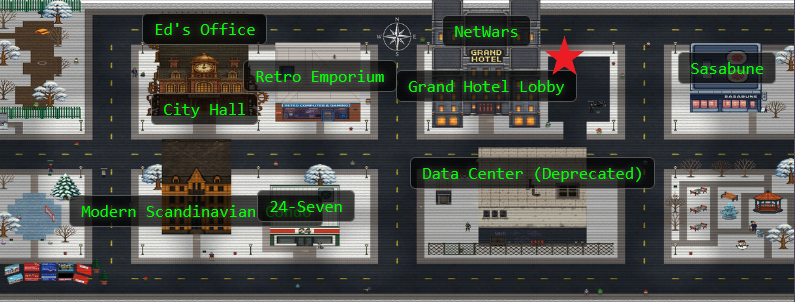
Help Goose Lucas in the hotel parking lot find the dangerously misconfigured Network Security Group rule that's allowing unrestricted internet access to sensitive ports like RDP or SSH.

Lucas
(Spanish mode) Hi... welcome to the Dosis Neighborhood! Nice to meet you!
¡Hola Lucas!
Lucas
Please make sure the towns Azure network is secured properly.
The Neighborhood HOA uses Azure for their IT infrastructure.
Audit their network security configuration to ensure production systems aren't exposed to internet attacks.
They claim all systems are properly protected, but you need to verify there are no overly permissive NSG rules.
Hints⚓︎
The Open Door
This terminal has built-in hints!
Solution⚓︎
Back at it again...
Azure CLI Crash Course⚓︎
Time to get familiar with the Azure command line interface. The terminal starts us off with a quick tour of output formats!
Listing Resource Groups in JSON
Welcome back! Let's start by exploring output formats.
First, let's see resource groups in JSON format (the default): az group list
JSON format shows detailed structured data.
Default JSON Output
az group list
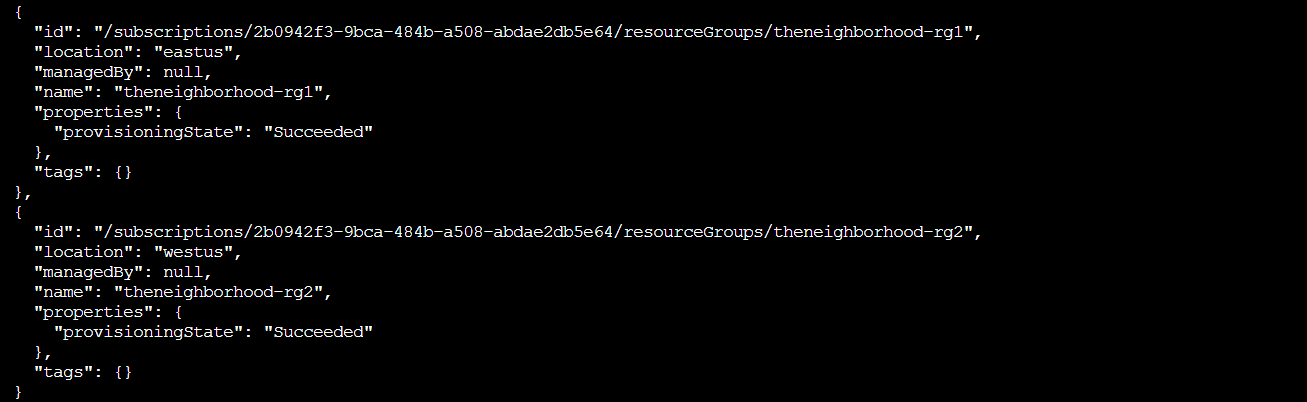
The default JSON output shows two resource groups: theneighborhood-rg1 and theneighborhood-rg2, both in eastus and westus regions. JSON gives us complete structured data with all properties, IDs, and metadata. Great for scripting, terrible for actually reading.
Making JSON Human Readable⚓︎
Much better! The -o table flag transforms that wall of JSON into something our brains can actually parse. JSON is perfect for machines, but humans need tables!
Converting to Table Format
Great! Now let's see the same data in table format for better readability 👀: az group list -o table
Notice how -o table changes the output format completely!
Both commands show the same data, just formatted differently.
Human Readable Table
az group list -o table

Same information, dramatically better presentation! The table format strips away the JSON structure and gives us just the essential columns: Name, Location, and ProvisioningState. Much easier to scan when you're hunting through Azure resources. It's the difference between reading a raw database dump and reading a spreadsheet.
Hunting for Firewall Holes⚓︎
Now for the actual audit! Network Security Groups (NSGs) control what traffic can flow to and from Azure resources. Time to see what the HOA has configured.
Finding All NSGs
Lets take a look at Network Security Groups (NSGs).
To do this try: az network nsg list -o table
This lists all NSGs across resource groups.
NSG Discovery
az network nsg list -o table

Five Network Security Groups spread across the two resource groups: nsg-web-eastus, nsg-db-eastus, nsg-dev-eastus, nsg-mgmt-eastus, and nsg-production-eastus. Standard naming convention with each NSG labeled by purpose and region. So far the HOA is following best practices with their naming. Let's peek inside and see if the actual rules are as clean!
Peeking Behind the Web Tier Curtain⚓︎
The terminal guides us to inspect individual NSGs starting with the web tier.
Inspecting Web Security Group
Inspect the Network Security Group (web) 🕵️
Here is the NSG and its resource group:--name nsg-web-eastus --resource-group theneighborhood-rg1
Hint: We want to show the NSG details. Use | less to page through the output.
Full NSG Configuration
az network nsg show --name nsg-web-eastus --resource-group theneighborhood-rg1 | less

Back to JSON output since we didn't specify -o table. The screenshot shows the NSG configuration with its ID, location, and the start of the securityRules array. Using less lets us scroll through without flooding the terminal. Nothing suspicious yet! The web tier looks locked down properly.
Management Tier Deep Dive⚓︎
Moving to the management tier! We use az network nsg rule list to focus on rules specifically.
Listing Management Rules
Inspect the Network Security Group (mgmt) 🕵️
Here is the NSG and its resource group:--nsg-name nsg-mgmt-eastus --resource-group theneighborhood-rg2
Hint: We want to list the NSG rules
Management Tier Rules
az network nsg rule list --nsg-name nsg-mgmt-eastus --resource-group theneighborhood-rg2 --output table | less
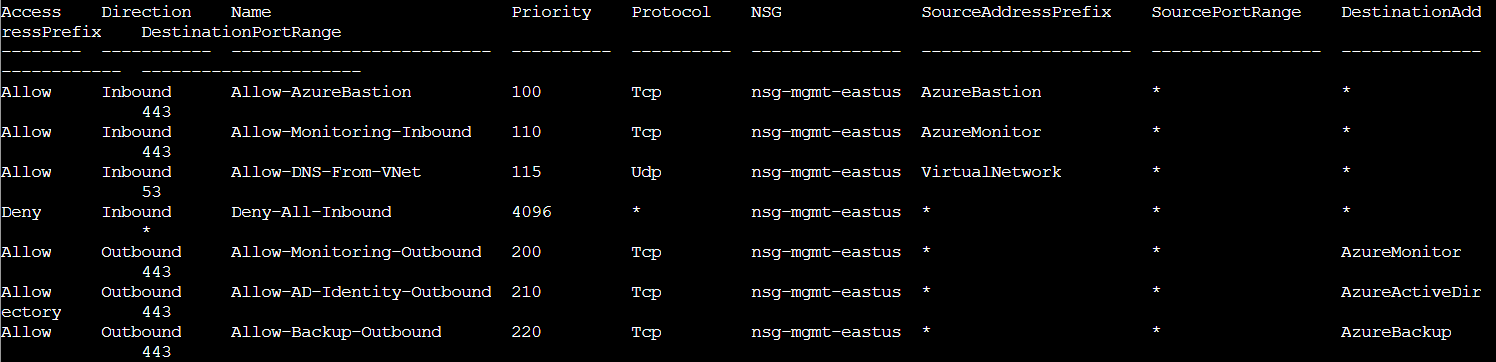
Now we're talking! The table format makes scanning rules easy. Looking at nsg-mgmt-eastus, we see inbound rules allowing TCP traffic from specific Azure services: Azure Baston on port 443, Azure Monitor on port 443, and DNS from VirtualNetwork on port 53. There's also a catch all "Deny All Inbound" rule at priority 4096. The outbound rules allow monitoring, Active Directory, and backup traffic. Everything here looks properly restricted to trusted Azure services! Two down, three to go. Maybe the HOA really did secure everything?
Finding the Internet-Facing RDP Disaster⚓︎
Time to examine the production NSG and find the security issue Lucas warned us about!
Auditing Production Rules
Take a look at the rest of the NSG rules and examine their properties. After enumerating the NSG rules, enter the command string to view the suspect rule and inspect its properties.
Hint: Review fields such as direction, access, protocol, source, destination and port settings.
Production NSG Enumeration
az network nsg rule list --nsg-name nsg-production-eastus --resource-group theneighborhood-rg1 --output table | less

There it is! Fourth rule down: Allow RDP From Internet on port 3389 with SourceAddressPrefix 0.0.0.0/0. Annnd there goes the HOA's claim about proper security!
Port 3389 is Remote Desktop Protocol (RDP). And 0.0.0.0/0 means the entire internet. This rule allows anyone anywhere to attempt RDP connections to whatever's behind this NSG.
The other rules are fine: HTTP on port 80, HTTPS on port 443, health probes from the Azure Load Balancer. But that RDP rule is a major security vulnerability. Let's examine it in detail!
Detailed Rule Inspection
az network nsg rule show --nsg-name nsg-production-eastus --resource-group theneighborhood-rg1 --name Allow-RDP-From-Internet | less
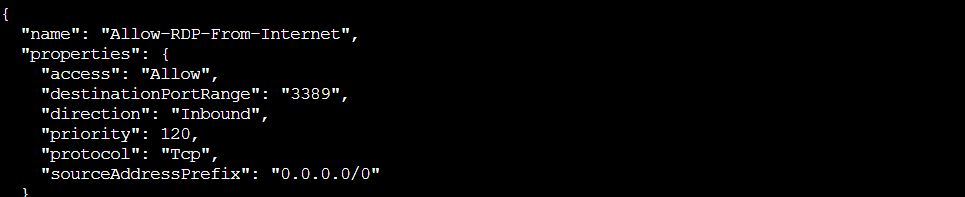
The JSON confirms everything:
- access:
"Allow"(bad) - destinationPortRange:
"3389"(very bad) - direction:
"Inbound"(extremely bad) - priority:
120(processes early) - protocol:
"Tcp"(RDP uses TCP) - sourceAddressPrefix:
"0.0.0.0/0"(nuclear explosion)
This rule accepts RDP connections from anywhere in the world. In production. With a priority of 120, meaning it gets evaluated before most other rules. Attackers can brute force passwords, exploit RDP vulnerabilities, or use stolen credentials to access the network!
Challenge Complete!⚓︎

The HOA claimed "all systems are properly protected" but we found one overly permissive NSG rule exposing the entire production environment to port 3389.
I have a sneaking suspicion that this HOA security fiasco is not over!
Lucas
Ha! 'Properly protected' they said. More like 'properly exposed to the entire internet'! Good catch, amigo.