Spare Key
Overview⚓︎
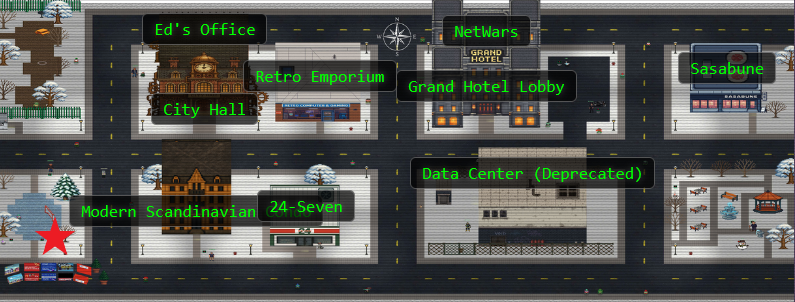
Help Goose Barry near the pond discover the accidentally leaked SAS token in a public JavaScript file and determine what Azure Storage resource it exposes and what permissions it grants.

Barry
You want me to say what exactly? Do I really look like someone who says MOOO?
Barry
The Neighborhood HOA hosts a static website on Azure Storage.
An admin accidentally uploaded an infrastructure config file that contains a long-lived SAS token. Use Azure CLI to find the leak and report exactly where it lives.
Hints⚓︎
Spare Key
This terminal has built-in hints!
Solution⚓︎
Barry is a grumpy goose. He wants us to find a leaked infrastructure config file in the HOA's Azure storage. Time to channel our inner security auditor again!
Scouting the Territory⚓︎
List Resource Groups
Let's start by listing all resource groups: az group list -o table
This will show all resource groups in a readable table format.
Resource Group Reconnaissance
az group list -o table

Perfect! We can see several HOA-related resource groups: rg-the-neighborhood, rg-hoa-maintenance, rg-hoa-clubhouse, rg-hoa-security, and rg-hoa-landscaping. Since Barry mentioned the HOA hosts a static website, rg-the-neighborhood seems like our best bet to start investigating. The HOA is really committed to that organized suburban life!
Finding the Storage Vaults⚓︎
Now that we know which resource group to target, let's see what's inside. Time to open some presents! 🎁
List Storage Accounts
Now let's find storage accounts in the neighborhood resource group 📦: az storage account list --resource-group rg-the-neighborhood -o table
This shows what storage accounts exist and their types.
Storage Account Discovery
az storage account list --resource-group rg-the-neighborhood -o table

We found five storage accounts, all HOA-themed: neighborhoodhoa, hoamaintenance, hoaclubhouse, hoasecurity, and hoalandscaping. Perfect! The neighborhoodhoa account is our prime suspect since it's the main HOA storage!
Verifying the Website Setup⚓︎
The challenge mentioned a static website, so let's verify that's actually set up.
Check Static Website Properties
Someone mentioned there was a website in here. Maybe a static website?
az storage blob service-properties show --account-name <insert_account_name> --auth-mode login
Website Configuration Check
az storage blob service-properties show --account-name neighborhoodhoa --auth-mode login

The output shows "enabled": true along with error and index document paths (404.html and index.html). Bingo! This confirms we're dealing with a static website. Now we know where to look for publicly accessible files.
Finding the Web Container⚓︎
Static websites in Azure use a special container. Let's find it and check the access levels.
List Containers
Let's see what 📦 containers exist in the storage account
💡 Hint: You will need to use az storage container list
We want to list the container and its public access levels.
Container Inventory
az storage container list --account-name neighborhoodhoa --auth-mode login
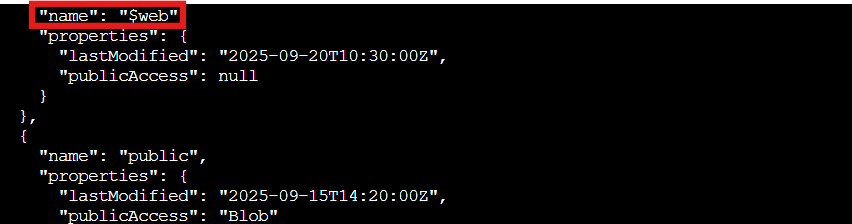
Two containers appear: $web (the standard container for Azure static websites) and public. The $web container has "publicAccess": null, meaning its blobs might still be accessible via the website URL even though the container itself isn't browsable. Got it! This is our target!
What's Lurking in the Static Website?⚓︎
Time to peek inside that web container and see what files are sitting there. Hopefully just holiday party announcements and lawn care guidelines...
List Blobs in Web Container
Examine what files are in the static website container
💡 hint: when using --container-name you might need '<name>'
Look 👀 for any files that shouldn't be publicly accessible!
Blob Discovery
az storage blob list --account-name neighborhoodhoa --container-name '$web' --auth-mode login --output table

Well well well, what do we have here? Along with the expected index.html and about.html files, there's a suspicious iac/terraform.tfvars file sitting in the publicly accessible static website container. Infrastructure-as-Code configuration files definitely shouldn't be public! Someone left their secrets under the tree for everyone to unwrap. 🎄
Unwrapping the Infrastructure Secrets⚓︎
That terraform file looks very out of place. Let's download it and see what security nightmares await us inside.
Examine Suspect File
Take a look at the files here, what stands out?
Try examining a suspect file 🕵️:
💡 hint: --file /dev/stdout | less will print to your terminal 💻.
Download and Inspect
az storage blob download --account-name neighborhoodhoa --container-name '$web' --name iac/terraform.tfvars --file /dev/stdout | less

The file contains a migration_sas_token with full read-write-delete permissions, expiring in 2100. That's right, a 75-year token lifetime! The comments even helpfully note it's "HIGHLY SENSITIVE" and warn to "Remove after data migration to new storage account." Classic security oversight!
Spoiler alert: they didn't remove it. And now it's publicly accessible on the internet.
This is exactly what you should never do with sensitive credentials. SAS tokens should be short-lived, tightly scoped, and never committed to version control or uploaded to public storage.
Challenge Complete!⚓︎

/iac/terraform.tfvars contains the leaked long-lived SAS token with excessive permissions. We found an infrastructure configuration file accidentally exposed in a public static website, containing a migration token that grants full storage access until the year 2100.
The HOA really needs to implement some secrets management best practices. Maybe add it to next month's meeting agenda, right after "Approval of Wreath Decorations" and before "Discussion of Acceptable Snowman Heights."
Barry
There it is. A SAS token with read-write-delete permissions, publicly accessible. At least someone around here knows how to do a proper security audit.
I'll take that as a compliment!